Best Local Models for AI Agents (Ollama, 2026)
Most guides hand you a table of model names and VRAM numbers and leave you to guess which row is yours. This one tells you exactly which model to load based on your hardware and what you want it to do.
Most guides hand you a table of model names and VRAM numbers and leave you to guess which row is yours. That’s not an answer — it’s homework.
So here’s the version that actually decides for you. It’s organized around the only two things that matter: what hardware you have, and what you want the model to do.
The One Thing That Changes Everything
Before any model names, internalize this — because it’s what every list-style guide gets wrong.
An AI agent like OpenClaw does its work by calling tools: running shell commands, hitting APIs, reading and writing files, sending messages. The thing that makes a model good or bad for this isn’t how clever it sounds in a benchmark. It’s how reliably it produces correct tool calls.
A model that’s slightly less smart but never fumbles a function schema is far more useful than a brilliant one that occasionally calls the wrong tool.
That single fact splits local models into two completely different jobs:
Heartbeat duty. The recurring “is there anything to do?” check. This needs almost no intelligence and no real tool-calling. Any small model does it perfectly, for free. This is what most people should run locally.
Real agent work. Writing, coding, multi-step tasks, deciding what to do with that email. This leans hard on tool-calling reliability, and it’s where small local models get shaky. This is the job that’s usually worth paying a few dollars a month for instead.
Keep those two jobs separate in your head and the model choice gets simple.
How to Read This: Find Your Tier
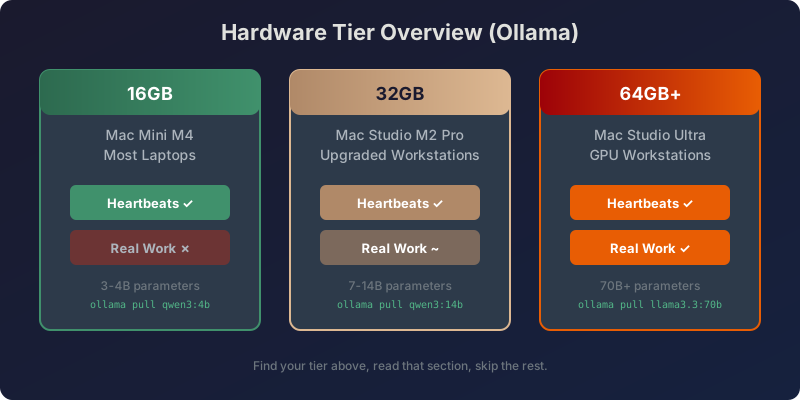
Three hardware tiers cover almost everyone. Find yours, read that section, skip the rest.
- 16GB (Mac Mini M4, most laptops): heartbeats yes, real work no. Read Tier 1.
- 32GB: heartbeats easily, real work maybe, with caveats. Read Tier 2.
- 64GB or a dedicated GPU: real local work becomes genuinely viable. Read Tier 3.
The Setup: Ollama vs LM Studio
Before diving into models, here’s the quick difference if you’re choosing a local model runner.
LM Studio is GUI-first — you download it, browse a built-in model catalog, click to load, and chat in a polished interface. It’s the easier on-ramp for beginners.
Ollama is CLI-first — you install it, pull models with a command, start a server, and talk to it over a REST API. It fits naturally into scripts, cron jobs, and any agent that speaks OpenAI’s format.
If you want a polished UI, LM Studio wins. If you want something that stays out of your way and works well in automation, Ollama is your pick.
The model recommendations below work for either — the hardware requirements are the same.
Tier 1: 16GB
This is the realistic setup for most readers. With 16GB, the model is sharing memory with your agent application and operating system, so you want something in the 3 to 4 billion parameter range. That leaves headroom and runs fast.
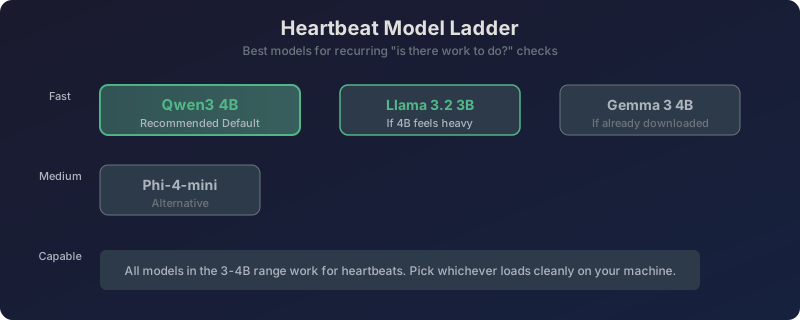
The default: Qwen3 4B. This is the right starting answer. It’s quick, reliable at the simple classification a heartbeat needs, and loads comfortably in 16GB with room to spare.
To pull it with Ollama:
ollama pull qwen3:4bIf Qwen3 4B feels heavy, drop to Llama 3.2 3B. Smaller, even faster, slightly less capable. On an older 16GB machine that’s also doing other things, this is the safer pick. For pure heartbeat duty you will not notice the intelligence difference, because the question is “is there work, yes or no?” and a 3B model answers that flawlessly.
ollama pull llama3.2:3bGemma 3 4B and Phi-4-mini are solid alternatives in the same weight class. If you’ve already downloaded one of these, it’s fine — don’t re-download just to switch.
What this tier cannot do
Models above 4B start causing problems on 16GB. You’ll see stutters, slowdowns, and occasional tool-calling failures that feel random but aren’t — the system is just running out of memory and improvising.
So: heartbeats only. Route real work to a cloud model and save yourself frustration.
Tier 2: 32GB
With 32GB, the game changes. Heartbeats are trivial. Real agent work becomes possible — with a few caveats.
First choice for real work: Qwen3 8B. This handles straightforward single-step tasks well. Summarizing a file? Writing a response? Running a simple tool chain? Qwen3 8B does this without burning through your API budget.
ollama pull qwen3:8bIf you want to push further: Qwen3 14B. This can run on 32GB but may struggle with longer multi-step chains. The real play here is using a “split” configuration — route easy tasks to the local model, keep hard tasks on a paid provider like Claude or DeepSeek until the local model earns your trust.
ollama pull qwen3:14bMistral Small is another strong candidate. It lands in the 7B range and offers good general capability for the memory you’re spending.
ollama pull mistral-small
The split strategy
After a week of running a local model alongside your paid provider, you’ll know exactly which tasks it can own. Easy stuff like:
- Checking for new items
- Drafting routine responses
- Running scripted file operations
Keep the complex stuff on your paid model until the local one proves itself. This isn’t about replacing cloud — it’s about shrinking the bill.
Tier 3: 64GB or a Dedicated GPU
Here is where things get interesting. Real local work becomes genuinely viable.
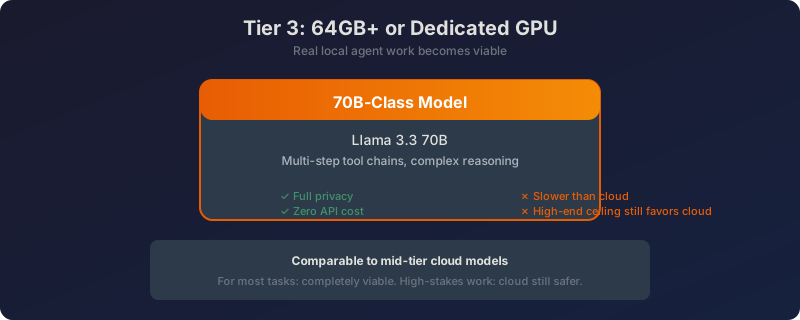
The target model: Llama 3.3 70B. This handles multi-step tool chains well enough to replace a mid-tier cloud model for most tasks. It’s slow — you’ll notice the latency compared to API calls — but the privacy and zero marginal cost are real.
ollama pull llama3.3:70bAny quantized 70B model that fits your VRAM works here. The exact name matters less than getting the parameter count and quantization right.
What you give up
Speed is the obvious tradeoff. Even on strong hardware, 70B models respond slower than a cloud API. For background tasks this doesn’t matter. For interactive work it gets annoying.
The other ceiling: the best tool-calling models (Claude Sonnet 4.5, GPT-4o) still outperform local 70B on complex reasoning tasks. Cloud remains the safer choice for high-stakes work.
But for everything else? Completely viable.
The Decision Path, Summarized
Here’s the one-paragraph version:
On 16GB? Load Qwen3 4B for heartbeats. Keep real work on a paid model. Done.
On 16GB and machine feels stressed? Drop to Llama 3.2 3B. You won’t notice the difference for heartbeats.
On 32GB and curious about going local? Run Qwen3 14B alongside your paid provider with a split config. Route easy tasks to it, keep hard tasks paid until it earns your trust.
On 64GB or real GPU? Run a 70B-class model for real work. Keep a small model for heartbeats. Accept slower responses as the trade-off for zero API cost and full privacy.
How to Test a Model Before You Trust It
Here’s a 60-second test you can run to verify a model’s tool-calling reliability.
Start the Ollama server if it’s not already running:
ollama serveIn another terminal, point your agent at a test file and give this task: “Replace the word ‘fins’ with ‘fines’ wherever it appears, and tell me exactly how many replacements you made.”
Check three things:
- Did it call the file tool, or just claim it would edit?
- Did it report a specific number? (Not vague like “several” — a count.)
- Did it handle the task correctly, or hallucinate an edit that never happened?
Run this test five times. Five clean passes means the model is trustworthy. Any failures and you know it’s only good for heartbeats.
A model that passes this test will save you real money. One that fails it will just cost you debugging time.

Frequently Asked Questions
Why does everyone list parameter counts and VRAM but not just tell me what to use?
Because it’s safer to list options than to make a claim. The honest answer is: small models for heartbeats, paid models for real work — unless you have 32GB+ and time to test.
Is local actually cheaper than just paying?
For heartbeats: yes, dramatically. Zero cost, constant availability.
For real work: closer than you think. Moving to a budget provider like DeepSeek V3.2 removes rate limits for about $5/month. Local saves that $5 only if you want privacy or offline capability. Pure cost math? Hard to beat your own electricity and the hassle of managing local models.
Does the model need to support tools to run heartbeats?
No. A heartbeat is just a classification question. Even models without tool-calling features work fine for this job.
My model loaded but the agent says no model available.
With Ollama, make sure the server is running (ollama serve) before your agent tries to connect. It runs on localhost:11411 by default — same endpoint the curl examples use.
How is this different from LM Studio?
Same model recommendations, same hardware tiers. The difference is in the interface: Ollama is CLI-first and API-centric, LM Studio is GUI-first and chat-centric. Pick based on how you want to interact with it day-to-day.
A Note on Model Names
Ollama’s library shifts regularly. Treat specific names in this guide as solid picks as of mid-2026 — but check the parameter count first, match it to your RAM, and verify the model loads cleanly before committing.
The framework is simple: run small models for heartbeats, test medium models for light work, push large models only when you have the hardware to back them.
That’s it. No benchmark tables. No VRAM spreadsheets. Just the model that’s right for your machine and your job.